
Features
On this page
- Overview
- Expense Tracking Feature
- What changes when the toggle is switched
- Who Can Toggle the Feature
- Toggle Logic Summary
- What Members See
- Expense Tracking ON
- Expense Tracking OFF (Club Level)
- How to Toggle Expense Tracking
- Turning Expense Tracking OFF
- Turning Expense Tracking ON
- Validations
- Frequently Asked Questions
- Related articles
Overview
The Features page under Settings allows club managers to enable or disable specific features for their club. Right now the feature available to toggle is Expense Tracking — additional features will appear on this page as they are released.
Disabling a feature hides its club-level UI from members — but no existing data is deleted. If a manager turns Expense Tracking off and then back on, all previously submitted expenses remain intact.
To access Settings — Features:
- Log in to CrickTeams as a Manager
- Click Settings from the left navigation menu
- Click Features from the Settings sub-menu

Expense Tracking Feature
Expense Tracking allows club members to submit, view and manage expenses. The toggle on the Features page controls whether this functionality is accessible across the club.
What changes when the toggle is switched
The toggle has three possible states depending on who controls it. The table below shows what players and managers see in each state.
| Area | Fully ON (global + club) | Club toggle OFF (personal-only mode) | Disabled globally by CrickTeams |
|---|---|---|---|
| Expenses entry under the Finances menu | Visible | Visible | Hidden entirely |
| My Expenses tab | Visible | Visible — the only tab shown | Not accessible |
| Players can track personal expenses | Yes | Yes | No |
| Non-personal usage bar | Visible | Hidden | Hidden |
| Club-level expense management | Available | Hidden | Hidden |
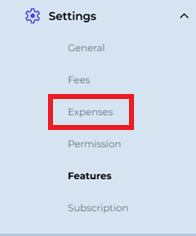
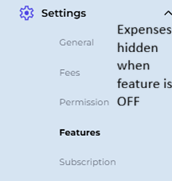
| Settings → Expenses (types & scopes) | Available (treasurer only, Pro/Premium) | Hidden | Hidden |
| Existing expense data | Visible | Club data preserved but hidden; personal data still visible | Preserved but hidden |
Who Can Toggle the Feature
There are two levels of control over the Expense Tracking toggle: the CrickTeams Admin (global) and the Club Manager (club level). Both levels must be ON for members to get the full Expense Tracking experience — if only the global switch is ON, members get personal-only mode.
| Role | What they control | Condition |
|---|---|---|
| Club Manager | Can toggle Expense Tracking ON or OFF for their own club only | Only if the feature is globally enabled by Admin |
| CrickTeams Admin | Controls the global switch for all clubs on the platform | If globally OFF, club managers lose the ability to toggle it themselves |
Toggle Logic Summary
| Global (Admin) | Club (Manager) | Result for members |
|---|---|---|
| ON | ON | Expense Tracking fully available |
| ON | OFF | Personal-only mode |
| OFF | — | Expense Tracking hidden for all clubs; the toggle no longer appears on the Features page |
What Members See
Expense Tracking ON
When the feature is enabled (both globally and at club level), members see the full Expense Tracking experience:
- The Expenses entry appears under the Finances menu in the left sidebar
- My Expenses tab is visible and accessible
- Players can submit personal expenses and track their own records
- Non-personal usage bar is visible (showing club expense totals)
- Club-level expense management is available to managers
- Settings → Expenses (custom types & scopes) is accessible to the club treasurer on Pro and Premium plans
Expense Tracking OFF (Club Level)
When a club manager disables the feature for their club (while it is still enabled globally), the club drops into personal-only mode for all members:
- The Expenses entry stays visible under the Finances menu
- Only the My Expenses tab is shown — players can still submit and view their personal expenses
- Non-personal usage bar is hidden
- Club-level expense management is hidden from managers
- Settings → Expenses (custom types & scopes) is hidden
| Global | Club | Result |
|---|---|---|
| ON | ON | Full expense tracking |
| ON | OFF | Personal-only mode — Expenses entry still visible under Finances, only My Expenses tab shown |
| OFF | — | Hidden entirely |
However:
- All existing expense data is preserved in the database
- Payment history and attachments are retained
- Turning the feature back ON restores the full view immediately
Only a global disable by the CrickTeams Admin removes the Expenses entry from the sidebar entirely — in that state, no expense functionality is accessible to any club member.
How to Toggle Expense Tracking
Turning Expense Tracking OFF
- Go to Settings → Features
- Locate the Expense Tracking card
- Click the toggle switch — it moves from blue (ON) to grey (OFF)
- The change takes effect immediately for all club members
Turning Expense Tracking ON
- Go to Settings → Features
- Locate the Expense Tracking card
- Click the toggle switch — it moves from grey (OFF) to blue (ON)
- The full expense experience — club tabs, usage bar and management tools — reappears immediately for all club members
- All previously submitted expenses and payment history are restored
Validations
The following rules apply to the Features toggle:
| Rule | Detail |
|---|---|
| Global OFF removes club toggle | If the Admin disables Expense Tracking globally, the feature disappears from the Features page — club managers cannot turn it on for their club |
| No data deletion on disable | Turning OFF never deletes expense records, payments or attachments |
| Instant effect | The toggle takes effect immediately — no save button or confirmation required |
| All members affected | The toggle applies to all members of the club — it cannot be set per player or per role |
| Manager-only access | Only club managers can see and use the Features page; players do not have access to Settings |
Frequently Asked Questions
Will disabling Expense Tracking delete our expense data?
No. Disabling the feature only hides the Expense Tracking UI — all submitted expenses, payment records and attachments are preserved in the database. Turning the feature back ON restores the full view immediately with no data loss.
Why did the Expense Tracking toggle disappear from my Features page?
This means the CrickTeams Admin has disabled Expense Tracking globally. When the global switch is OFF, the feature no longer appears on the Features page — unless CrickTeams has granted your club early access, in which case the toggle stays and keeps working. Contact CrickTeams support if you believe this is incorrect.
Does turning off Expense Tracking affect the Settings → Expenses page?
Yes. When you turn Expense Tracking OFF for your club, Settings → Expenses is hidden along with the other club-level expense tools — custom types and scopes cannot be managed while the feature is OFF. Personal expense tracking under My Expenses is not affected.
Can I disable Expense Tracking for just one player?
No. The toggle applies to the entire club — every member drops to personal-only mode when it is disabled. There is no per-player or per-role control on this setting.
What happens to players currently viewing expenses when I turn the feature OFF?
The change takes effect immediately. Players currently in the Expenses section will drop to personal-only mode on their next navigation action — they keep My Expenses but lose the club-level views. Their data is not affected.
Is there a way to see which features are available on my plan?
Yes. Go to Settings → Subscription to view your current plan and the features included. Some features, such as Settings → Expenses configuration, are only available to the club treasurer on Pro and Premium plans.
Related articles
- Expenses — Submit and manage club expenses
- Expenses — Configure custom expense types and scopes
- Permissions — Manage club managers and captain roles
- Subscription — View and manage your plan and billing